
What is translated
- Zendesk's own text (buttons, forms, the request list, community) comes in the 37 languages of Zendesk's standard theme.
- Northline's own text (the Topics menu, quick search, Copy page, video library, status card and so on) is translated into English, Arabic, Chinese (Simplified), Dutch, French, German, Hebrew, Italian, Japanese, Korean, Polish, Portuguese, Spanish and Swedish. Other languages show these few words in English.
- Your settings' text (headline, subtitle, contact block, what's new, video library title): a theme setting holds one text for every language. While a text still has Northline's default, each visitor sees it in their language. Once you write your own, it shows as you wrote it in every language.
Right-to-left languages
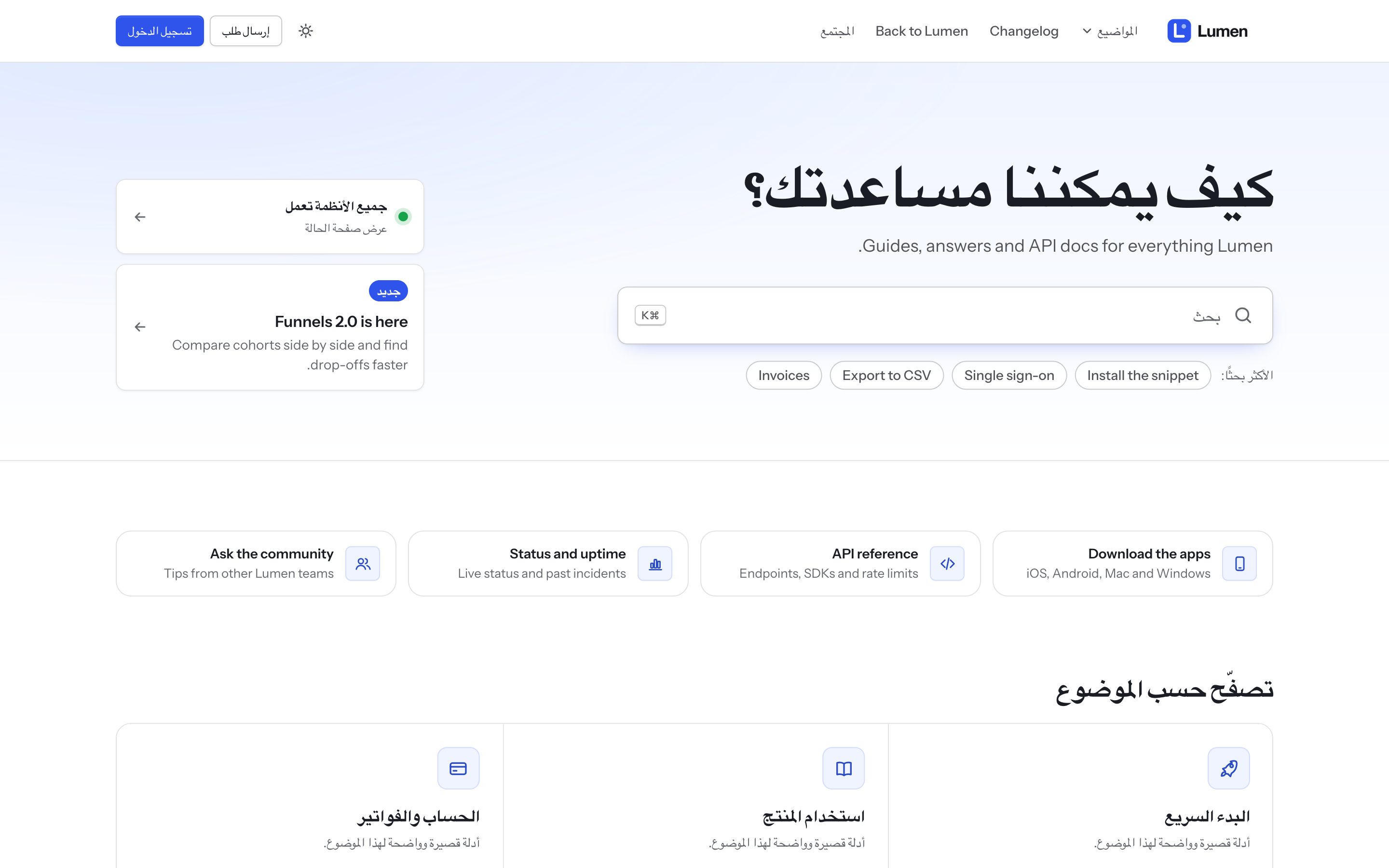
In Arabic and Hebrew the whole layout mirrors: navigation, menus, arrows, the article sidebar, carousels and the request form. Code blocks stay left-to-right. Each paragraph of an article, comment or post takes its direction from its own text, so an English paragraph in an Arabic article reads correctly, punctuation included.
Translated content
Northline shows whatever your help center has in the visitor's language. Topic icons follow each topic's name in its original language, so translated topics keep their icons. Videos and their library work per language.
Japanese, Chinese and Korean
Long lines without spaces wrap correctly in titles, menus and articles.